
Kubernetes-Native Application Design
When Your App Becomes a Bad Kubernetes Citizen
Your application runs perfectly in development. Docker container builds without issues. You deploy to Kubernetes, and within minutes, pods are crashing, restarts cascade across the cluster, and the on-call engineer is debugging why health checks fail during a deployment that should have been routine. The issue? Your application wasn’t designed to be a good Kubernetes citizen—it doesn’t speak the platform’s language.
The Kubernetes Contract: Beyond Containerization
Building Kubernetes-native applications requires understanding an implicit contract between your code and the orchestrator. Unlike traditional deployments where applications start, run, and stop on predictable schedules, Kubernetes treats your app as a dynamic, replaceable component in a constantly shifting system. The platform will kill your pods without warning during node maintenance, scale them horizontally when load spikes, and route traffic away during deployments—all without asking permission.
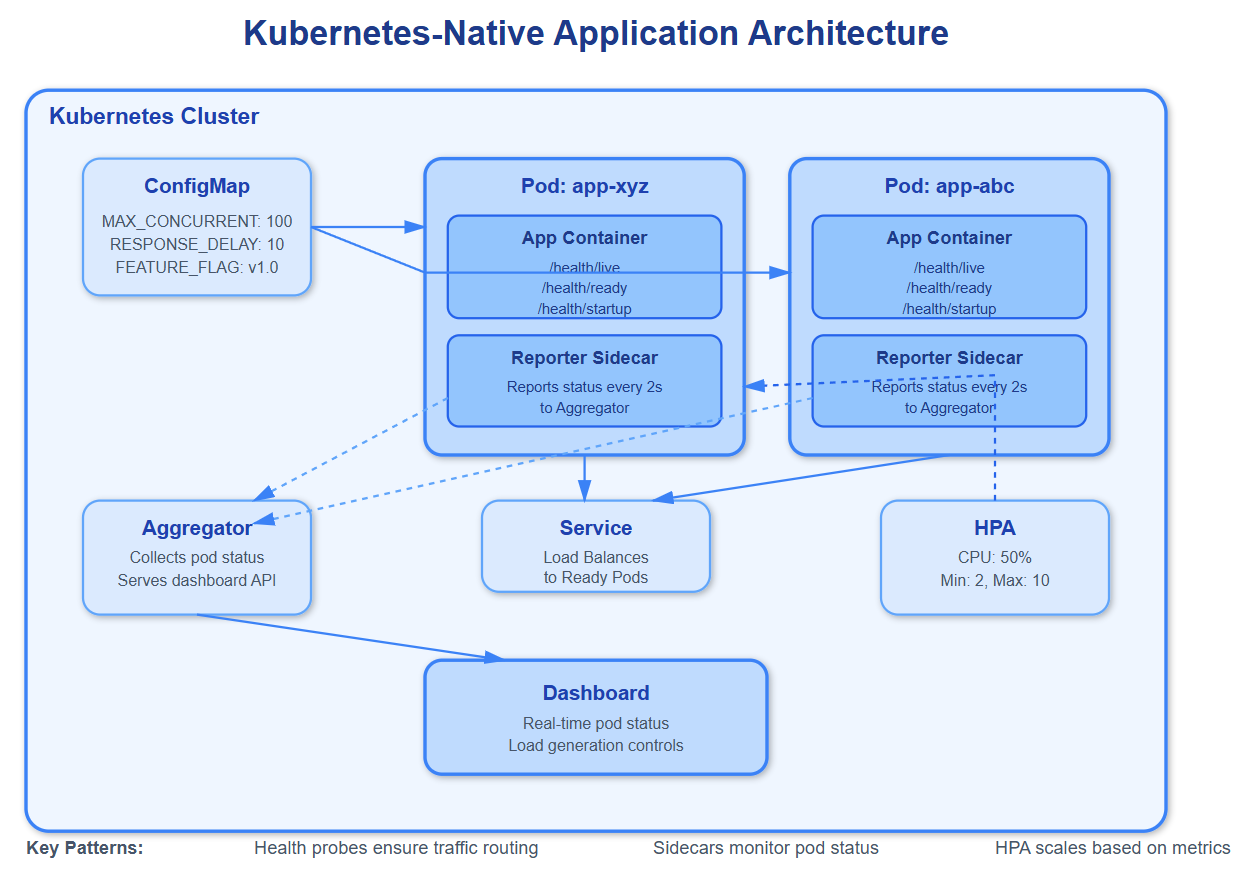
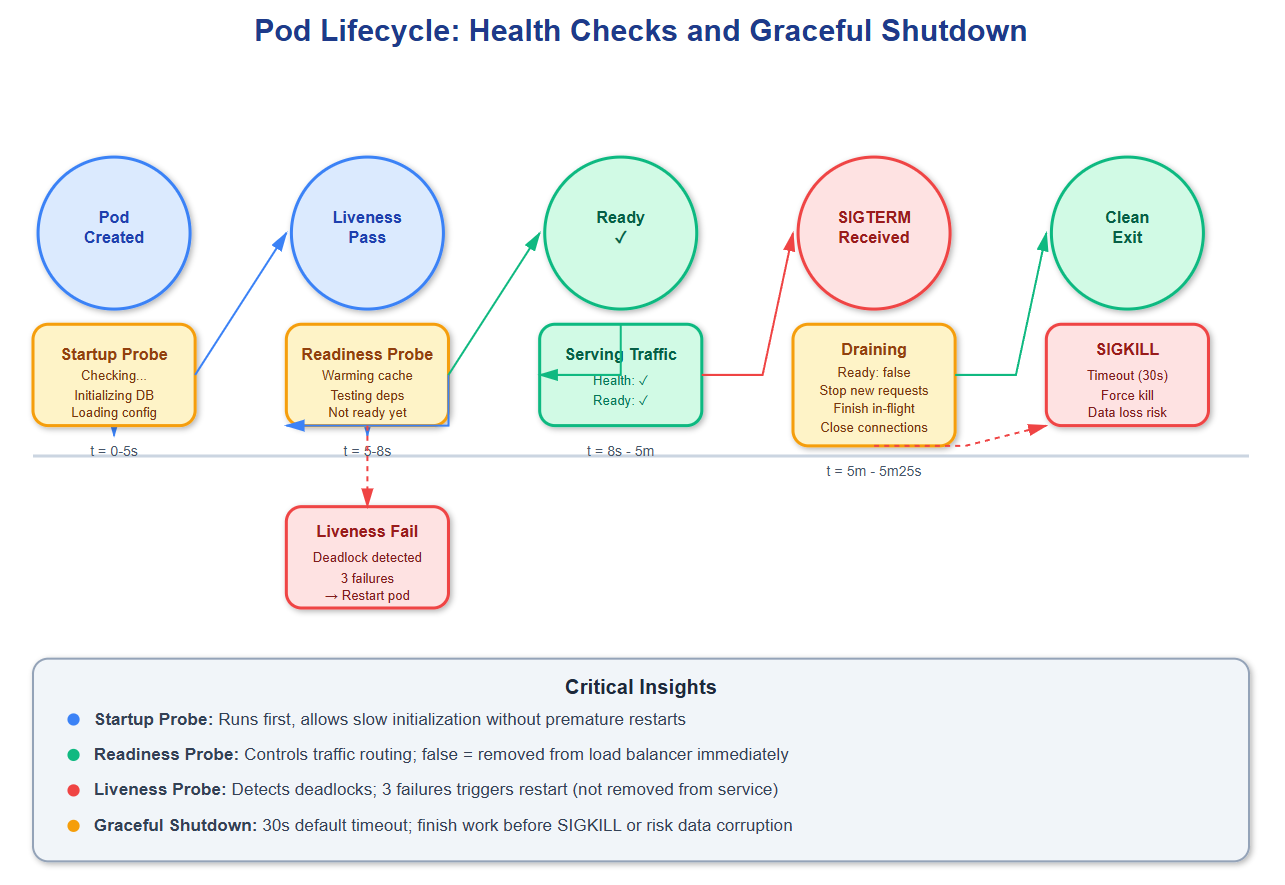
The foundation starts with health checks—Kubernetes’ way of asking “are you alive?” and “are you ready?” These aren’t the same question. Liveness probes detect when your app enters an unrecoverable state (deadlocked threads, corrupted memory), triggering a restart. Readiness probes determine if your instance can handle traffic right now—during startup, while loading data, or when downstream dependencies fail. A common mistake: returning HTTP 200 from /health as soon as the web server starts, before database connections initialize or caches warm up. This causes Kubernetes to route traffic to pods that will fail requests, degrading user experience.
Graceful shutdown is equally critical but often overlooked. When Kubernetes sends SIGTERM to your pod, you have 30 seconds (default) before SIGKILL. During this window, you must: stop accepting new connections, finish processing in-flight requests, flush buffers to disk or remote storage, and close database connections cleanly. If your app doesn’t handle SIGTERM, Kubernetes will hard-kill it, potentially leaving transactions incomplete or data inconsistent. Netflix discovered this when they noticed corrupted viewing history records during deployments—their services weren’t draining connections before termination.
Resource requests and limits form the scheduling contract. Requests tell Kubernetes “I need at least this much CPU/memory to function,” while limits enforce “don’t let me consume more than this.” The scheduler uses requests to decide which node can run your pod; the kubelet uses limits to prevent resource exhaustion. A subtle trap: if you set limits too close to requests, normal traffic spikes cause throttling (CPU) or OOMKills (memory). Google’s production systems typically set limits at 2-3x requests to absorb variance while preventing runaway processes.
Configuration management through ConfigMaps and Secrets decouples environment-specific values from container images. Your image should be immutable across dev/staging/production; only configuration changes. However, many teams misuse ConfigMaps by storing connection strings, timeouts, and feature flags together. When one value changes, Kubernetes doesn’t automatically restart pods—you need to implement configuration reloading or use ConfigMap hash annotations to trigger rolling updates. Spotify learned this when a ConfigMap update caused half their pods to use old cache settings while new pods used updated values, creating split-brain behavior.
Critical Insights: The Hidden Complexity
Common Knowledge: Health check endpoints should verify dependencies (database connectivity, downstream services). Implementation matters—a health check that queries every dependency on every request creates additional load and false negatives when dependencies have transient issues. Use circuit breakers and cached health status with TTLs.
Rare Knowledge: Init containers run sequentially before main containers start, perfect for schema migrations or data seeding. But they share the pod’s restart policy—if an init container crashes, Kubernetes restarts the entire pod, including all init containers from the beginning. This creates unexpected delays during deployments when later init containers depend on earlier ones completing successfully.
Advanced Insight: Horizontal Pod Autoscaler (HPA) bases decisions on metrics averaged over 15 seconds (default). If your app serves bursty traffic with sub-second spikes, HPA won’t react in time—by the time new pods are scheduled and become ready, the spike is over. For these patterns, use vertical pod autoscaling for resources or implement predictive scaling based on time-of-day patterns. Amazon’s Prime Day preparations involve pre-scaling hours in advance because HPA can’t react to their traffic growth rate.
Strategic Impact: Rolling updates become dangerous without proper readiness checks and pod disruption budgets. Kubernetes drains pods (sends SIGTERM) but immediately routes traffic away if readiness fails. Without readiness checks, new pods receive traffic before initialization completes. Without pod disruption budgets, cluster autoscaler or node maintenance can evict all pods simultaneously during off-peak hours, causing total service outage.
Implementation Nuance: StatefulSets provide stable network identities and persistent storage, critical for databases and message queues. But they roll out updates sequentially, waiting for each pod to become ready before updating the next. For a 10-pod StatefulSet with 30-second initialization, updates take 5+ minutes. Deploy-time configuration changes can block for unacceptable durations. Use Deployments for stateless services; tolerate eventual consistency in StatefulSets.
Operational Complexity: Service mesh sidecars (Envoy, Linkerd) inject proxy containers into every pod, intercepting all network traffic. This adds 5-15ms latency per request and consumes 50-100MB memory per pod. At scale (1000+ pods), that’s 50-100GB overhead. Uber found service mesh cost-prohibitive for their ride-matching services operating at microsecond latency budgets—they reverted to direct service-to-service communication with custom retry logic.
How Top-Tier Systems Implement K8s-Native Design
GitHub Link
https://github.com/sysdr/sdir/tree/main/Kubernetes-Native_Application_DesignNetflix: Runs 2,500+ microservices on Kubernetes (migrated from Titus). They implement custom admission controllers that validate resource requests against historical usage, preventing over-provisioning. Their pods include Spectator sidecars for metrics collection and chaos engineering agents that randomly inject failures, ensuring applications handle disruptions gracefully.
Spotify: Operates 300+ Kubernetes clusters across multiple cloud providers. They discovered that default pod priority classes caused non-critical batch jobs to starve user-facing services during node pressure. They implemented custom priority tiers with preemption policies, ensuring critical services always have resources even when clusters run near capacity.
Airbnb: Built their dynamic configuration system on Kubernetes ConfigMaps with custom operators that automatically restart pods when configurations change. They use hash annotations (configmap.reloader.stakater.com/reload) to track changes and progressive delivery (canary) for configuration rollouts—testing config changes on 1% of pods before full deployment.
Architectural Considerations: When and How
Kubernetes-native design adds operational complexity—health check endpoints need testing, graceful shutdown needs verification, resource tuning requires load testing. For simple applications or small teams, this overhead may exceed benefits. Start with Docker Compose for development; adopt Kubernetes when you need orchestration features (auto-scaling, self-healing, declarative deployments).
Monitoring and observability become critical in Kubernetes environments where pods are ephemeral. Instrument your application to emit metrics (Prometheus), structured logs (JSON with request IDs), and distributed traces (OpenTelemetry). Without observability, debugging pod crashes or performance degradation across rolling deployments becomes nearly impossible.
Cost implications are non-trivial. Kubernetes itself consumes 1-2 CPU cores and 2-4GB memory per node for control plane components and DaemonSets (CNI plugins, monitoring agents). For small workloads, this overhead can exceed application resource usage. Cloud-managed Kubernetes (EKS, GKE, AKS) charges $0.10/hour per cluster ($72/month) before any workload runs.
Use Kubernetes-native patterns when you need: dynamic scaling based on metrics, rolling updates with zero downtime, multi-region deployments with traffic shifting, or declarative infrastructure management. Avoid over-engineering—a single-pod deployment in Kubernetes adds complexity without benefit; start simple and grow into advanced features as needs emerge.
Practical Takeaway: Experience K8s-Native Design
This lesson includes a complete demonstration system showing Kubernetes-native patterns in action. Run bash setup.sh to deploy a microservices application with proper health checks, graceful shutdown, configuration management, and horizontal pod autoscaling.
The demo creates a local Kubernetes cluster using kind (Kubernetes in Docker), deploys a sample application with production-grade patterns, and launches a React dashboard displaying real-time pod status, health check results, and autoscaling behavior. You’ll see how Kubernetes handles pod failures, configuration updates, and traffic routing during rolling deployments.
Use the load generator to simulate traffic spikes and observe HPA scaling decisions. Intentionally crash pods to watch liveness probes trigger restarts. Update ConfigMaps to see configuration reloading in action. The demo includes detailed comments explaining each pattern and how it prevents common production issues.
Experiment by modifying resource limits to trigger OOMKills, adjusting health check parameters to see timing effects, or changing pod disruption budgets to observe maintenance behavior. Every pattern demonstrated addresses real problems teams encounter when running production workloads on Kubernetes. Understanding these patterns transforms you from deploying containers to architecting resilient, cloud-native systems.