
Load Balancing 101: How Traffic Gets Distributed
Load balancing is a critical component in modern distributed systems that ensures high availability and reliability by distributing network traffic across multiple servers. Let's explore how it works and why it matters.
Load Balancing Overview
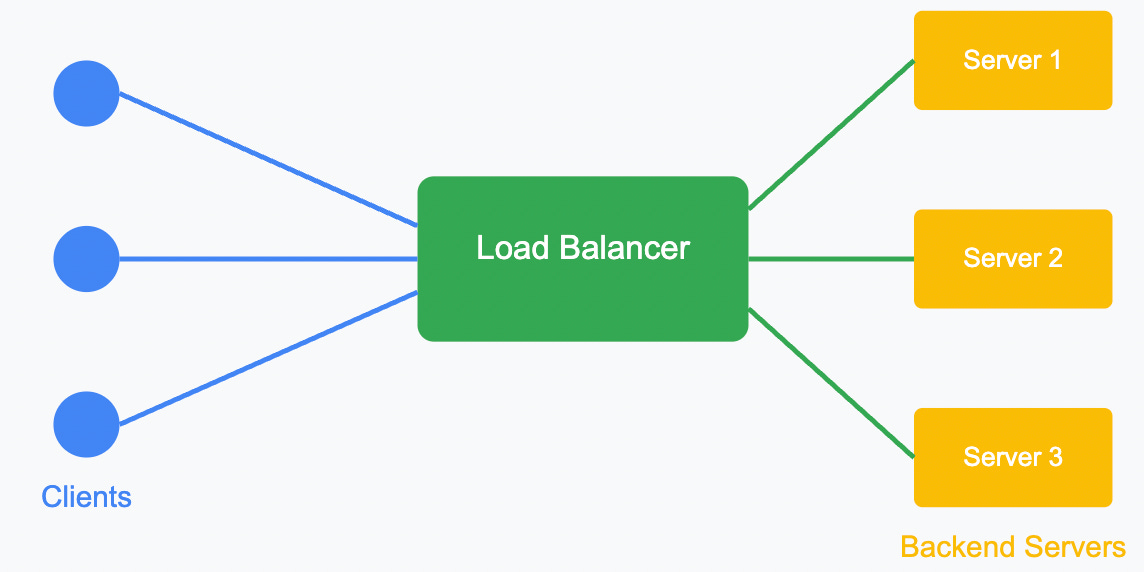
What is Load Balancing?
Load balancing is the process of distributing network traffic across multiple servers to ensure no single server bears too much demand. By spreading the workload, load balancers help
Prevent server overloads
Optimize resource usage
Reduce response time
Ensure high availability
Provide fault tolerance
How Load Balancers Work
Load balancers sit between client devices and backend servers, routing client requests across all available servers capable of fulfilling those requests.
Load Balancing Algorithm
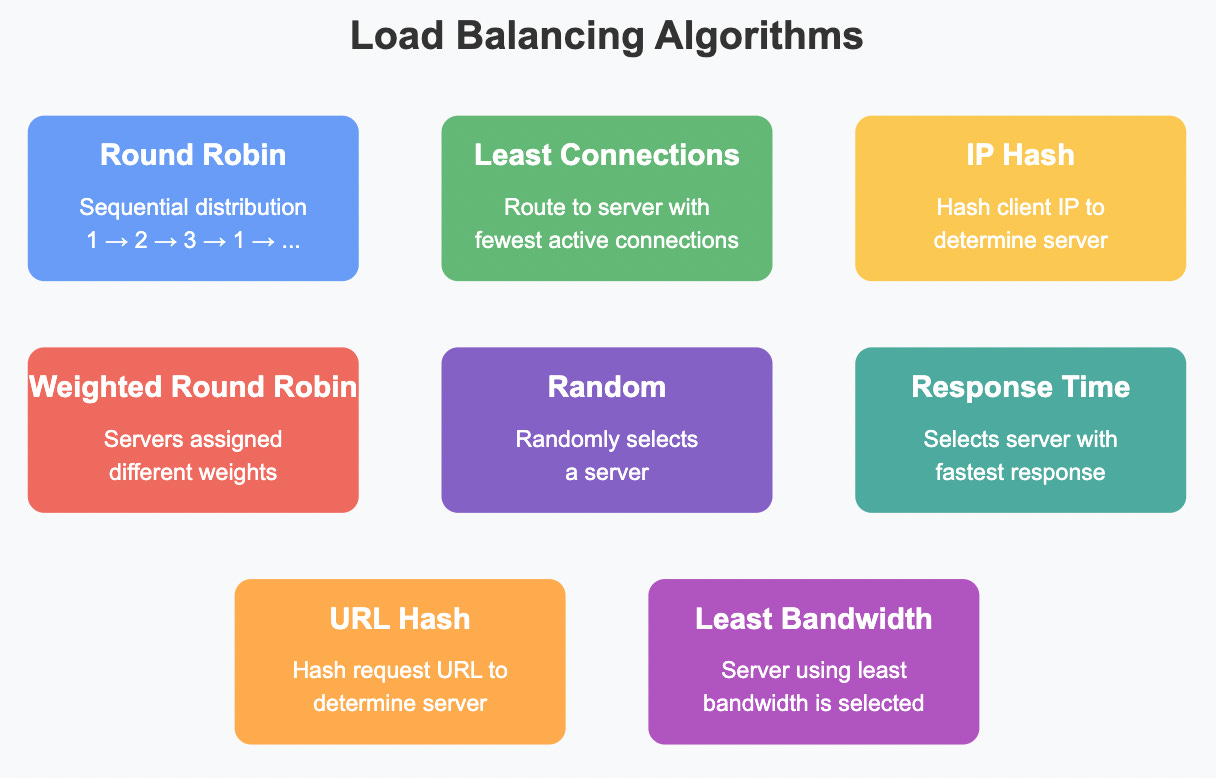
Key Load Balancing Algorithms
1. Round Robin
The simplest method that distributes requests sequentially to each server in the pool. Server 1 gets the first request, Server 2 gets the second, and so on.
Example: A web application with three servers. Request 1 → Server 1, Request 2 → Server 2, Request 3 → Server 3, Request 4 → Server 1, etc.
2. Least Connections
Routes traffic to the server with the fewest active connections, which is particularly useful when requests might require varying processing times.
Example: Server 1 has 15 active connections, Server 2 has 10, and Server 3 has 5. The next request goes to Server 3.
3. IP Hash
Uses the client's IP address to determine which server receives the request. This ensures a client is consistently directed to the same server, which helps maintain session consistency.
Example: User A's IP hash maps to Server 2, so all requests from User A always go to Server 2.
4. Weighted Round Robin
Similar to Round Robin but assigns different weights to servers based on their capacity.
Example: Server 1 (weight: 5), Server 2 (weight: 3), Server 3 (weight: 2). Out of 10 requests, 5 go to Server 1, 3 to Server 2, and 2 to Server 3.
5. Least Response Time
Directs traffic to the server with the quickest response time, which indicates both availability and speed.
Example: Server 1 responds in 15ms, Server 2 in 8ms, and Server 3 in 12ms. The next request goes to Server 2.
Types of Load Balancers
Types of Load Balancers
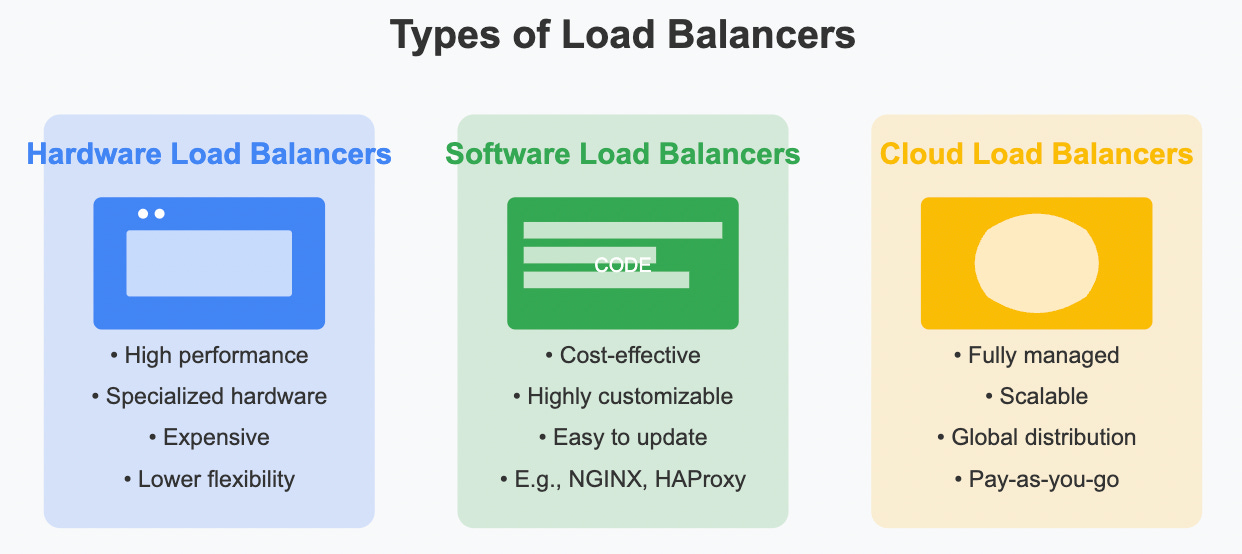
1. Hardware Load Balancers
Physical devices optimized for load balancing with dedicated processors and ASICs.
Example: F5 BIG-IP, Citrix ADC, Barracuda Load Balancer
Pros:
High performance
Reliability
Security features
Cons:
Expensive
Limited scalability
Hardware maintenance
2. Software Load Balancers
Software applications installed on standard servers that provide load balancing functionality.
Example: NGINX, HAProxy, Apache Traffic Server
Pros:
Cost-effective
Flexible configuration
Easy to update
Cons:
May have lower throughput than hardware options
Requires separate server maintenance
3. Cloud Load Balancers
Managed services provided by cloud providers.
Example: AWS Elastic Load Balancing, Google Cloud Load Balancing, Azure Load Balancer
Pros:
No maintenance required
Highly scalable
Global distribution
Pay-as-you-go pricing
Cons:
Less customization
Vendor lock-in concerns
Layer 4 vs. Layer 7 Load Balancing
Layer 4 vs. Layer 7 Load Balancing
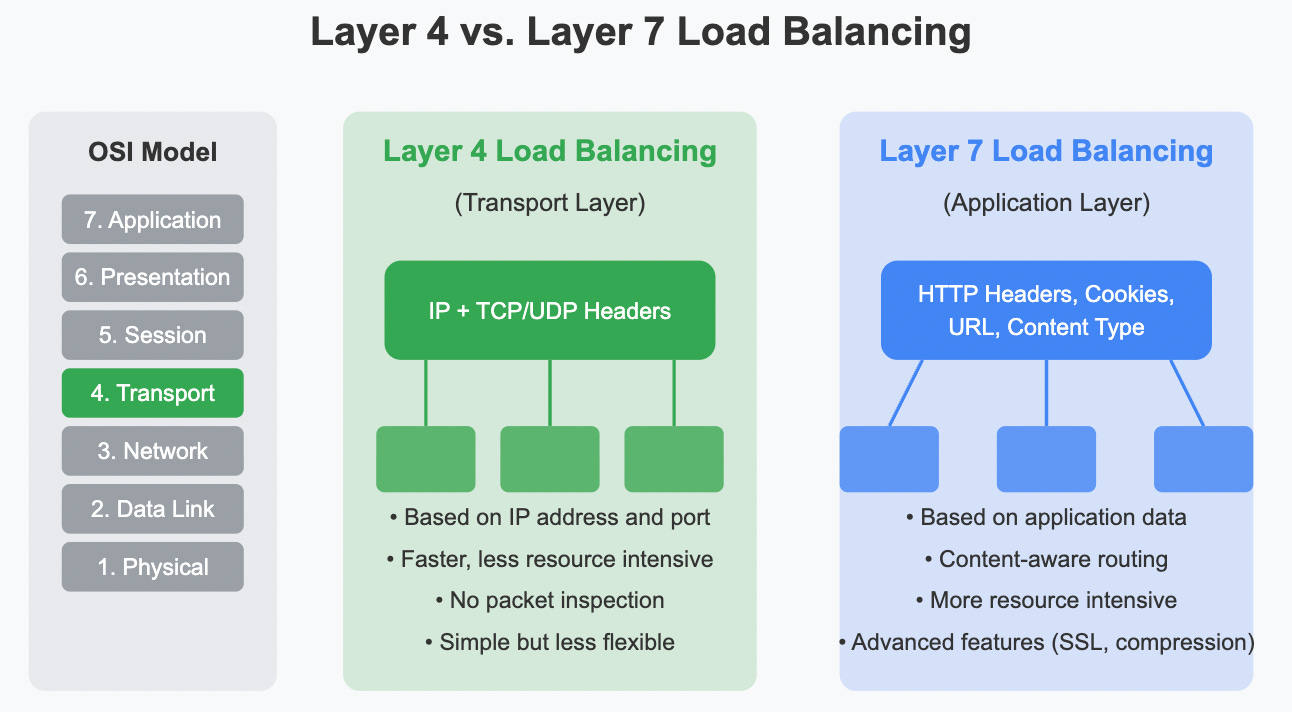
Load balancers can operate at different OSI model layers:
Layer 4 Load Balancing (Transport Layer)
Routes based on IP address and port
Doesn't inspect packet content
Faster and requires fewer resources
Can't make routing decisions based on content
Example: Distributing traffic based solely on TCP/UDP port numbers. All HTTP traffic (port 80) goes to web servers, while all database traffic (port 3306) goes to database servers.
Layer 7 Load Balancing (Application Layer)
Routes based on content (URL, HTTP headers, cookies)
More intelligent routing decisions
More resource-intensive
Can implement advanced features like SSL termination
Example: Routing requests to different servers based on the URL path. Requests to /images/* go to image servers, /api/* to API servers, and other URLs to web servers.
Real-World Load Balancing Scenarios
E-commerce Website
Layer 7 load balancing directs catalog browsing to web servers
Payment processing gets routed to dedicated secure servers
Product images served from optimized content delivery servers
During flash sales, least connections algorithm ensures even distribution
Video Streaming Service
Geolocation-based load balancing sends users to the nearest data center
Content-aware routing directs video streams to specialized streaming servers
Authentication requests go to dedicated authentication servers
Health checks constantly monitor server status to prevent routing to failed nodes
Load Balancer Health Checks
Load balancers regularly check the health of backend servers using:
TCP connection checks: Verify if a TCP connection can be established
HTTP/HTTPS requests: Send HTTP requests to a specific endpoint
Custom application checks: Verify application functionality beyond basic connectivity
Session Persistence
Sometimes it's necessary to send a user's requests to the same server:
Source IP affinity: Routes based on client's IP address
Cookie-based persistence: Uses HTTP cookies to track which server handled previous requests
Application-controlled persistence: Application itself manages session state
Benefits of Load Balancing
High Availability: If one server fails, traffic is automatically distributed to healthy servers
Scalability: Easily add or remove servers based on demand
Efficiency: Optimize resource utilization across all servers
Security: Can act as a buffer between clients and servers, filtering malicious traffic
Flexibility: Perform maintenance without service disruption
Implementing Load Balancing: A Simple NGINX Example
Here's how to implement a basic round-robin load balancer using NGINX:
http {
    upstream backend_servers {
        server backend1.example.com;
        server backend2.example.com;
        server backend3.example.com;
    }

    server {
        listen 80;
        location / {
            proxy_pass http://backend_servers;
        }
    }
}
Conclusion
Load balancing is a fundamental component of modern distributed systems architecture. By effectively distributing traffic across multiple servers, organizations can achieve higher reliability, better performance, and greater scalability. Whether implemented through hardware, software, or cloud services, load balancers help ensure that applications remain available and responsive even under heavy load.
A good first introduction to the subject. Concise and well written.
🤝