Windowing Strategies in Stream Processing: Tumbling, Sliding, and Session Windows Explained
The Million-Event-Per-Second Problem
Imagine you’re tracking real-time stock trades arriving at 500,000 events per second. Your dashboard needs to show “trades in the last minute” and “peak trading volume in 5-second bursts.” How do you slice an infinite stream of data into meaningful chunks without overwhelming your system or missing critical patterns? This is where windowing strategies become your secret weapon—the difference between a stream processor that merely survives and one that thrives under pressure.
How Windows Tame Infinite Streams
Stream processing windows are time-based or count-based boundaries that segment continuous data flows into finite, processable batches. Unlike batch processing where you wait for all data to arrive, windows operate on data in motion, making split-second decisions about when to trigger computations.
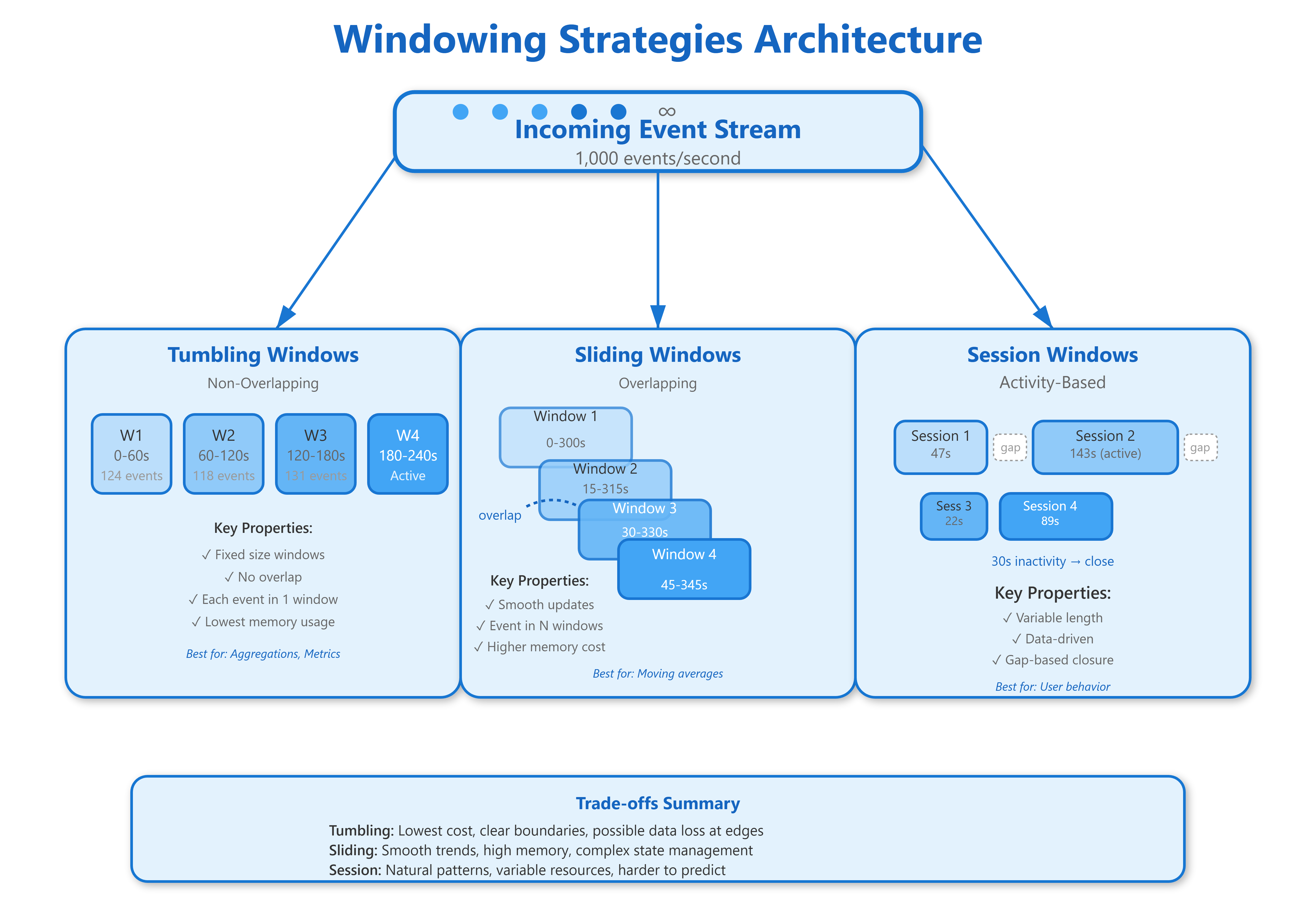
Tumbling Windows divide time into fixed, non-overlapping segments. Think of them as buckets that fill up for exactly 60 seconds, then seal and process—never looking back. A new bucket immediately starts collecting the next 60 seconds of data. If you’re calculating “requests per minute,” each minute gets its own isolated bucket. Events at 10:00:59 and 10:01:01 land in completely different windows, even though they’re just 2 seconds apart.
Sliding Windows create overlapping time segments that move forward incrementally. Imagine a 10-minute window that advances every 30 seconds—at any moment, you’re looking at the last 10 minutes of data, but your view updates twice per minute. This provides smoother, more continuous metrics but processes the same event multiple times (each event appears in 20 different 10-minute windows if sliding every 30 seconds). The computational cost is higher, but you gain the ability to spot trends emerging before they show up in tumbling windows.
Session Windows are data-driven rather than time-driven. They group events based on activity patterns, closing the window after a defined period of inactivity. If a user clicks around your site for 5 minutes, goes silent for 15 minutes (your inactivity threshold), then returns, you get two separate session windows. These windows have variable lengths—one user’s session might be 2 minutes while another’s is 47 minutes—making them perfect for behavior analysis but challenging for resource planning.